A familiar face. A stronger foundation.
Your child learns with the face and voice of someone they love, through patient explanations, guided practice and encouragement.
- Playschool through Grade 12
- CBSE · ICSE · IGCSE · IB

Whether you’re helping your child or learning for yourself, YourGuru explains patiently, shows each step and practises with you until it makes sense.

Get the right experience from the first day, whether you're supporting your child or learning for yourself.
Your child learns with the face and voice of someone they love, through patient explanations, guided practice and encouragement.

Work through college coursework, build job-ready skills and understand challenging ideas with explanations that meet you where you are.
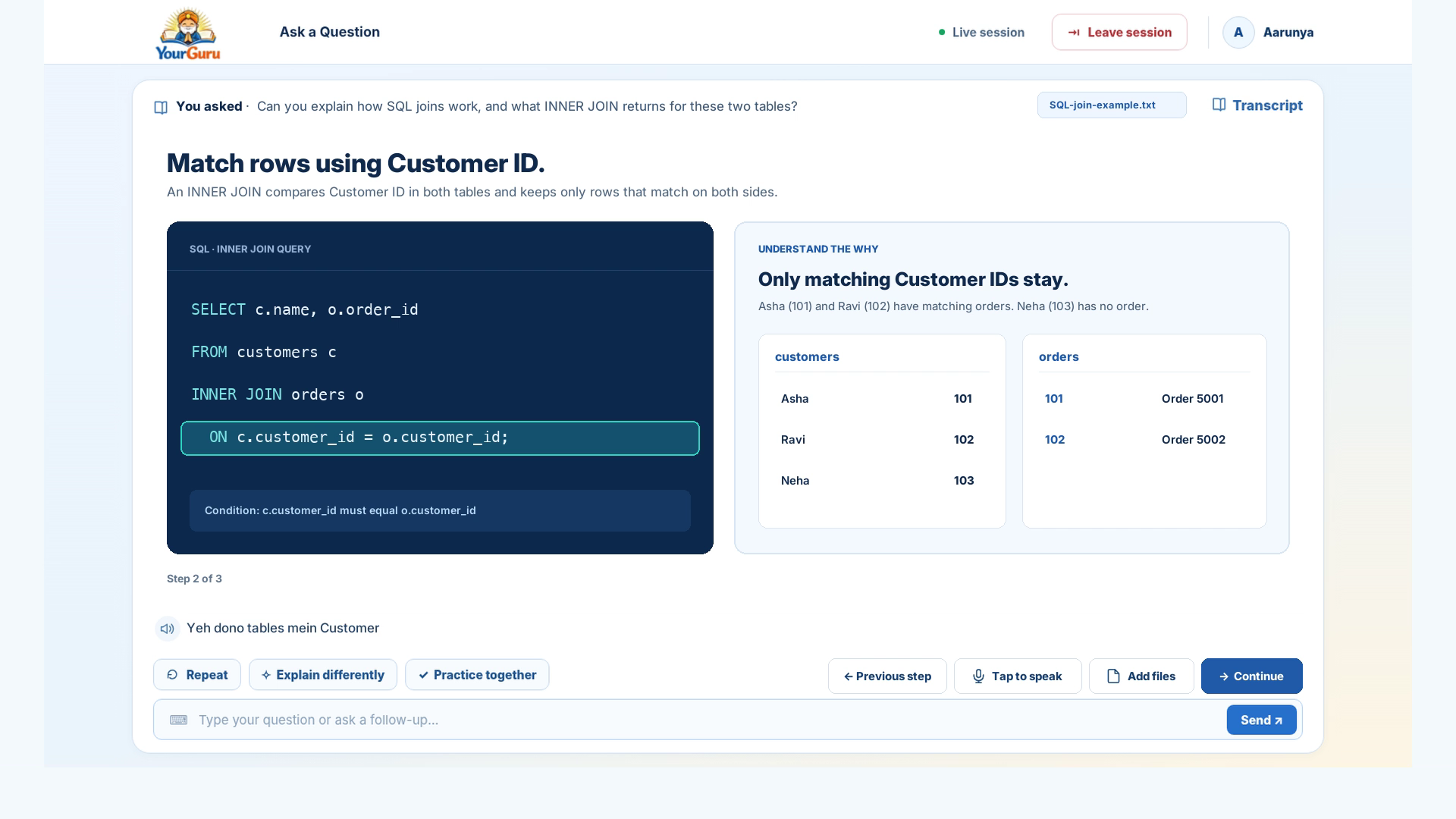
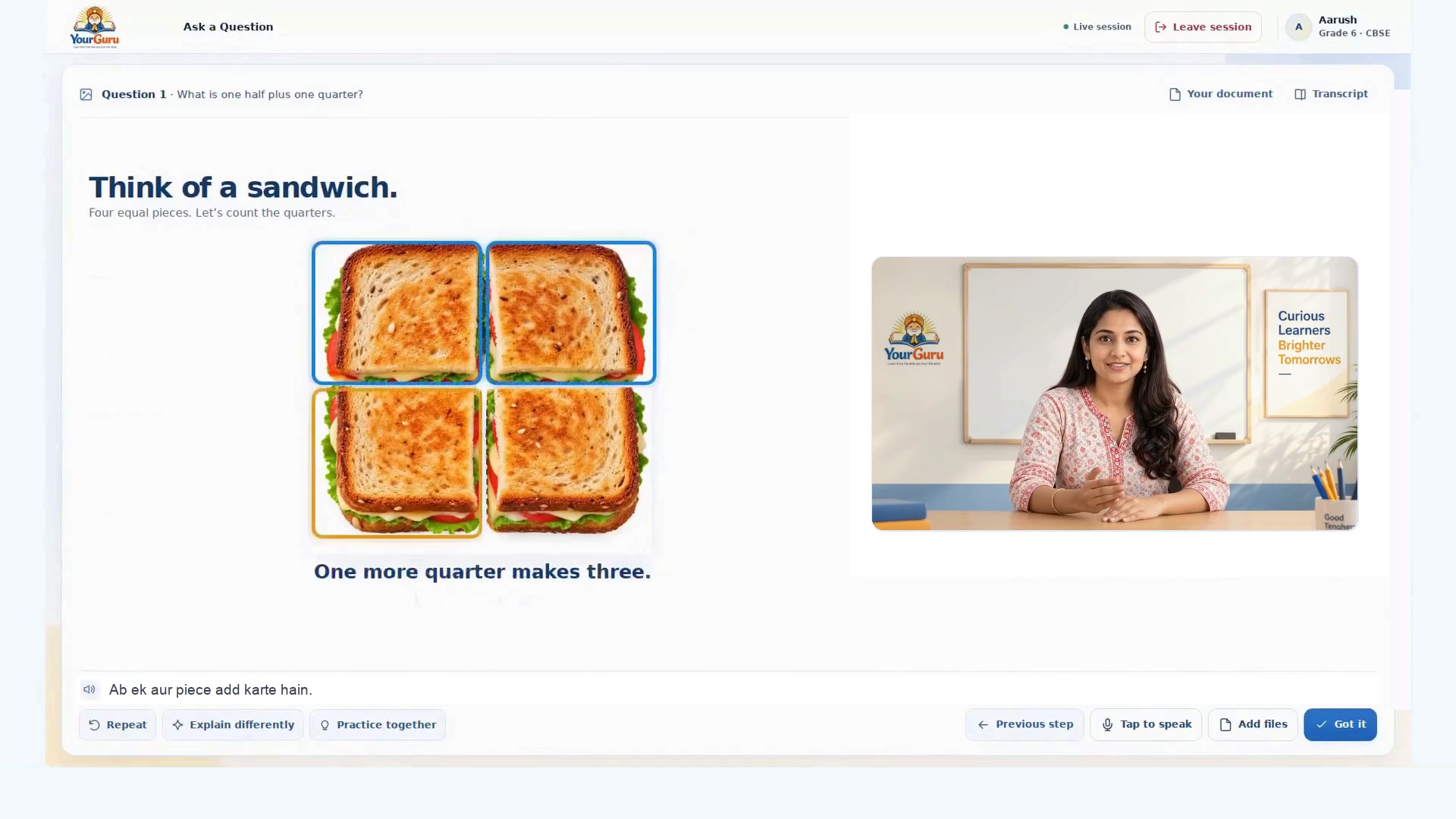
See a question turn into a clear explanation, guided problem-solving and confident practice.
Watch a familiar loved-one tutor explain step by step, check understanding and guide practice.
Watch YourGuru explain step by step, work through examples and guide practical problem-solving.
YourGuru doesn't stop when it gives you an answer. It works through the reasoning with you.
Speak a question or share what you are working on. Adults can type a question too.
Follow clear explanations on the learning board and see each step with an example.
Try the next step yourself and get helpful feedback as you work through it.
Hear an explanation again, or return to eligible saved learning when you need it.
Repeat is available with Free and Premium. Explain Differently and Practice Together are included with Premium.
Choose one or more languages from English and 11 major Indian languages. YourGuru can explain naturally in a familiar language while keeping important academic terms in English, just as a patient teacher would.
Your child sees and hears their loved one as the tutor. The familiar face and voice make every explanation feel personal, while YourGuru guides real understanding and practice.


Build confidence in college subjects, difficult concepts and professional skills. Ask questions, work through examples and practise what you learn.
Start free. Choose monthly or yearly billing and the right learning experience for you.
* Daily 1-hour classes depend on published curriculum availability for your child's board and grade.
Ask a Question is available with your loved-one tutor after setup. Today's Class is coming soon.
View current Daily Learning coveragePlans are selected when you sign up. Add more children or eligible Daily Learning time later from Parent Mode.
Add another child from Parent Mode after onboarding, with their own tutor and progress.
Pricing unavailableWhen more time is needed to reach a learning goal, add time to an eligible child's daily class. Choose 1–12 months with no automatic renewal.
Pricing unavailableWhat families, students and professionals want to know before getting started.
Parents can set up YourGuru for children from Playschool through Grade 12. Adults aged 18 and above can register and learn independently for college subjects, career skills and other educational questions.
Yes. YourGuru works on supported web browsers across phones, tablets and laptops. Native iOS and Android apps are coming soon.
Yes. The parent records a loved one's video during setup. YourGuru uses the approved recording to create a familiar tutor identity, with face moments alongside the teaching whiteboard and their familiar voice throughout the learning experience.
YourGuru can help with individual questions at any time. When Daily Learning is available for the child’s board and grade, Parent Mode can plan around the remaining school year and carry unfinished topics forward without promising unrealistic syllabus coverage.
Yes. Use Ask a Question for concepts and problems in college coursework, programming, databases and many professional subjects. You can bring your notes or code and ask for examples and guided problem-solving. It is not a professional qualification or certification service.
Yes. Premium is available on monthly or yearly billing for both audiences. Family and Extended Family plans provide additional child capacity for parent-managed accounts. Prices and renewal terms are shown clearly before checkout.
Repeat is available in Free and Premium to hear the current accepted explanation again. Explain Differently and Practice Together require an eligible Premium plan. Saved school Replays and adult Learning History are separate paid benefits and depend on actual saved content.
Ask a Question lets your child ask aloud or upload a textbook page, workbook, question paper or attempted answer. YourGuru explains the reasoning step by step. It works independently of the phased Daily Learning release once the loved-one tutor is ready.
Yes. An authorized parent can record a replacement through Parent Mode. The current approved tutor remains available until the replacement has passed quality checks and is ready.
The tutor gives a suitable safe response or redirect instead of continuing an unsafe request. Relevant safety events follow the approved parent-notification and privacy rules.
An authorized parent can manage the children in their household, loved-one recordings, eligible learning settings, progress and saved replays, plan and billing, support and privacy controls.
Yes. Adults can type or speak a question, paste code and add accepted notes, documents and images. Follow-ups continue in the same learning context. The product explains code and examples; it does not execute arbitrary uploaded code.
Eligible promotional offers can be applied during plan selection. The final offer and payable amount are confirmed in the secure checkout before any payment.
Yes. YourGuru supports English and 11 major Indian languages: Assamese, Bengali, Gujarati, Hindi, Kannada, Malayalam, Marathi, Odia, Punjabi, Tamil, and Telugu. For example, it can explain in natural Hindi mixed with English academic terms so the explanation sounds familiar without losing the words used in school or at work.
Daily Learning is being introduced by reviewed board-and-grade combinations. Where it is available, the one-hour class is included in eligible paid plans. Ask a Question is available independently after loved-one tutor setup. You can check current coverage before paying.
Yes. College students and professionals can type or speak questions, upload documents and images, and listen to explanations. You can continue the same topic with follow-up questions and guided practice.
Free includes up to 15 minutes of Ask a Question per day. Premium provides unlimited 24/7 Ask a Question, with additional benefits based on whether you choose School & Family or College & Career. Compare the features in the pricing section.
Share textbook pages, worksheets, notes, questions, attempted answers and supported documents or images. YourGuru uses the material you share to make its explanation relevant to your question.
You can sign in on supported devices, but each named child or self-managed adult has one active learning session at a time. Moving to another device uses a secure session-transfer process, rather than opening a second simultaneous session. A parent’s separate management access does not count as an extra child seat.
YourGuru supports questions from children in Playschool through Grade 12, including CBSE, ICSE/CISCE, Cambridge IGCSE and IB programmes. Structured Daily Learning is released separately for eligible board-and-grade combinations.
Adults aged 18 or above create a self-managed learning account and choose a plan. Then they can use Ask a Question for coursework, professional skills and other learning needs.
Premium adults can revisit eligible saved explanations, worked steps and available audio in Learning History. The adult experience is voice-and-chat based, without tutor video replay.
YourGuru is designed with separate access controls for child and self-managed adult accounts. Learning materials and personal information are handled under our Privacy Policy and the applicable account consent choices.
When available for your child’s board and grade, a one-hour class follows a structured learning sequence: recap, questions, concept explanation, practice, a short understanding check and summary. Unfinished topics can carry forward.
The parent or guardian provides a continuous 30–60-second recording and authorizes the separate recording consent. YourGuru checks the submitted recording for quality before activating the tutor. The recording is kept private under the applicable consent and retention controls.
Children use a separately PIN-protected profile and an age-appropriate, moderated tutoring experience. They cannot access account billing, unrestricted chat or another child’s records. Parents manage settings and consent.
A parent or guardian controls the child’s account setup and required consents. Personal data and uploaded work are subject to the Privacy Policy and the child-specific access, storage and deletion safeguards.
No. YourGuru complements schoolwork and human teaching with patient explanations, help on individual questions and guided practice. Daily Learning is available progressively by board and grade.
Yes. You can cancel according to your plan terms; access continues through the paid billing period before the applicable Free entitlements resume. Your account settings explain the current subscription and renewal state.
YourGuru guides you through the reasoning, one step at a time. With Premium, you can ask for a different approach or use Practice Together to apply what you learned instead of copying a quick answer.
Child learning is voice-first. Children ask questions aloud or add their schoolwork as files. Unrestricted text chat is not available in Child Mode; the experience remains parent-managed and age appropriate.
Ask a Question can work through individual challenging academic problems with step-by-step explanations. This is question help; it is not a claim that a complete competitive-exam coaching programme is available.
The adult experience focuses on on-demand Ask a Question, not scheduled Daily Learning classes. You can learn through voice, chat, documents, examples and guided practice at your own pace.
Choose Premium, Family or Extended Family during registration. After onboarding, parents can add another child through Parent Mode, subject to their plan. Where eligible, extra Daily Learning time can also be offered in Parent Mode when a child needs more time. It is not required for Ask a Question.
Ask, understand, practise and grow—at school, at college or beyond.